Gaming GPUs vs AI GPUs: Same Silicon, Very Different Minds
I still remember the day clearly.
I was building an AI model from scratch, not fine-tuning, not calling an API, actually training one. I had my datasets ready, loss functions planned, and weeks of curiosity stored up.
A friend joined me with his brand-new gaming laptop, confident and excited.
“RTX GPU bro, this will fly,” he said.
A few hours later, reality kicked in.
My training loop crawled. VRAM maxed out. Batch sizes shrank. Mixed precision barely helped. Meanwhile, the laptop fans screamed like a jet engine preparing for takeoff.
That day taught me as well him, something important:
Gaming GPUs and AI GPUs are not the same, even if they share the same brand name.
The difference isn’t just marketing.
It’s architecture, optimization, and intent.
Let’s unpack that, wisely, visually, and practically.
The shared myth: “A GPU is a GPU”
At the surface level, GPUs look identical:
- Thousands of cores
- Lot of parallelism
- High memory bandwidth
But GPUs are designed around workloads, not buzzwords.
- Gaming GPUs are built to draw frames fast
- AI GPUs are built to multiply matrices efficiently and repeatedly (an absolute mathematical operations right?)
That single difference changes everything.
Architectural intent: What the actually GPU is thinking about
1. Gaming GPU architecture (graphics-first)
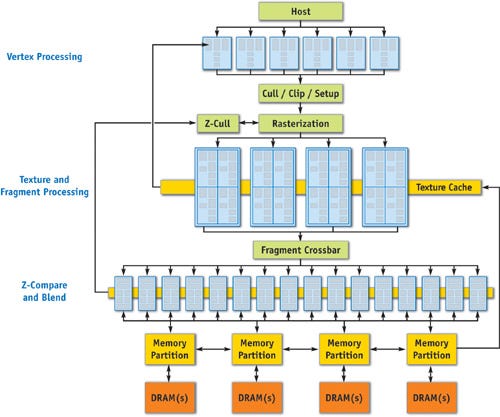
A gaming GPU is built to draw images on the screen as fast as possible.
To do that, it follows a fixed sequence called the graphics pipeline, think of it like an assembly line for creating each frame you see in a game.
Here’s what happens, step by step:
- Vertex processing
Calculates where objects exist in 3D space (position, size, rotation). - Geometry shading
Adds or modifies shapes for example, turning simple models into detailed ones. - Rasterization
Converts 3D objects into 2D pixels that can appear on your screen. - Pixel / fragment shading
Decides the color, brightness, and lighting of each pixel. - Texture sampling
Applies surface details like skin, metal, grass, or fabric. - Frame buffer output
Sends the final image to your monitor this is one completed frame.
Why gaming GPUs are optimized this way?
Because games must feel smooth and responsive, gaming GPUs prioritize:
- High clock speeds → frames are generated faster
- Fast context switching → quickly handle changing scenes and actions
- Dedicated raster & texture units → realistic visuals with minimal delay
- Low latency → instant response when a player moves or clicks
Gaming GPUs care about how fast each frame is produced.
If a frame is late, the player notices, so time per frame is everything.
2. AI GPU architecture (compute-first)
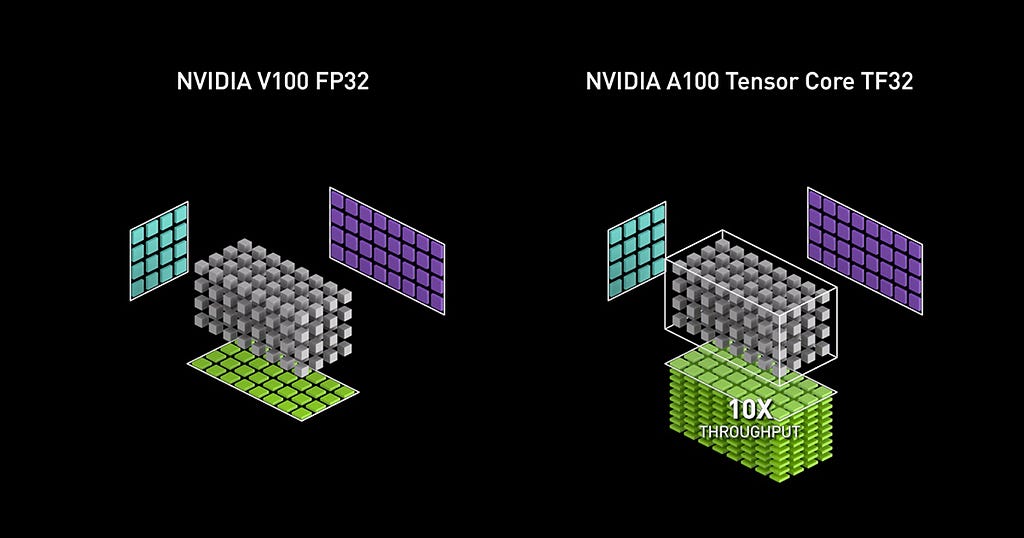
AI GPUs flip the priorities entirely.
They are designed around:
- Dense matrix multiplication
- Vectorized math
- Sustained throughput for hours or days
Architectural highlights:
- Tensor cores / matrix engines
- Large VRAM (HBM, ECC-enabled)
- Wide memory buses
- Lower clocks but massive parallel compute
- Error correction for long training runs
In short: AI GPUs care about operations per second over time.
No rasterization.
No textures.
No visual shortcuts.
Just math. Relentless math.
Working principles: Frames vs tensors
1. How a gaming GPU “works”
A gaming GPU processes:
- Millions of small, independent tasks
- Each task must finish quickly
- Precision is flexible (visual tricks hide errors)
Example:
- A shadow is close enough
- A reflection is visually acceptable
If something is 0.5% inaccurate, the human eye doesn’t care.
2. How an AI GPU “works”
An AI GPU processes:
- Fewer massive, tightly-coupled operations
- The same operation repeated billions of times
- Numerical stability matters deeply
Example:
- A 0.5% numerical drift during training
- Can destabilize gradients
- Can ruin convergence after hours of compute
That’s why AI GPUs emphasize:
- FP16 / BF16 / FP32 consistency
- Accumulation accuracy
- Deterministic math paths
Optimization: Why the same code behaves differently
1. Gaming GPU optimization
Optimized for:
- Shader execution
- Texture cache locality
- Branch-heavy workloads
- Burst performance
This is perfect for:
- Games
- 3D rendering
- Video effects
- UI compositing
But not ideal for:
- Large batch matrix ops
- Memory-heavy models
- Multi-hour sustained loads
2. AI GPU optimization
Optimized for:
- Tensor contraction
- Memory reuse
- Pipeline parallelism
- Sustained thermal stability
This is why AI GPUs:
- Run slower clocks
- But stay stable for days
- And deliver higher effective throughput
That’s also why AI frameworks (PyTorch, JAX, TensorFlow):
- Automatically target tensor cores
- Prefer specific memory layouts
- Penalize gaming GPUs silently
VRAM: The most misunderstood difference
Gaming GPUs:
- 8–16 GB VRAM (often GDDR)
- Optimized for fast asset swapping
- No ECC (error correction)
AI GPUs:
- 24–80+ GB VRAM
- Optimized for model residency
- ECC enabled (critical for long training)
Rule of thumb:
If your model doesn’t fit fully in VRAM, performance collapses.
This is where many “powerful” gaming GPUs fail quietly.
Choosing the right GPU: Use-case driven, not hype driven
If you’re a student / beginner in AI
Choose:
Gaming GPU (RTX class)
Focus on:
- Learning
- Prototyping
- Fine-tuning small models
Why it works:
- Affordable
- CUDA support
- Enough tensor capability for learning
If you’re training medium to large models
Choose:
- AI-oriented GPUs
- Or cloud AI accelerators
Focus on:
- VRAM first
- Memory bandwidth second
- Compute third
Your bottleneck will almost never be raw FLOPS.
If you’re doing inference at scale
Choose based on:
- Batch size
- Latency tolerance
- Cost per inference
Sometimes:
- A gaming GPU is perfect
Sometimes: - A dedicated inference accelerator wins
There is no universal “best GPU”.
A simple mental model (this saves money)
Think like this:
- Gaming GPU → Fast sprinter (direct to learn & initial actions)
- AI GPU → Marathon runner (long-term bet + lot of actions)
Both are athletes.
Both are powerful.
But putting a sprinter into a marathon ends badly.
Final thoughts: What my friend learned (and you don’t have to)
That friend with the gaming laptop?
He didn’t buy the wrong machine — he just bought it for the wrong job.
The biggest mistake engineers make is assuming:
“More GPU power = better AI performance”
Reality is subtler.
Architecture decides destiny.
If you choose GPUs based on workload characteristics, not marketing labels, you’ll:
- Train faster
- Spend less
- Debug fewer nightmares
- And sleep while your models train
And trust me, that’s a luxury worth architecting for…
Gaming GPUs vs AI GPUs: Same Silicon, Very Different Minds was originally published in Towards AI on Medium, where people are continuing the conversation by highlighting and responding to this story.